



Step 1. Download the Licence to Publish Proceedings Form – PPF (copyright form)
- For all manuscripts in the ICDSE 2026 Proceedings, authors must download the Licence to Publish Proceedings Form (PPF) [link] must be submitted by the corresponding author.
- By filling PPF with adequate information (signature, full name, date, address, email), the authors formally grant specific permission to Springer to publish their papers.
Step 2. Prepare Your Final Manuscript
- The camera-ready versions should not exceed the page limit of 8 pages in length (A maximum of 2 extra pages is allowed beyond 8 pages, with extra fee). The authors must prepare papers strictly following the Springer templates and the ICDSE 2026 guide.
- All papers must adequately address reviewers’ feedback and revise potential paragraphs and sentences for plagiarism.
- For using third-party material in the manuscript, authors must visit the Rights Holder website or Copyright Clearance Center Marketplace [https://marketplace.copyright.com/]. If the material is not found, please exert your best efforts to use our Permissions Request Form [Click here for the PRF form] and/or Release Request Form [Click here for the RRF form] (to obtain permission from interviewees or other identifiable individuals or the owners of identifiable property in the source material) for your request. If the rights-holder issues their own form, please ensure that the document they provide includes all Required Rights.
- An example of a camera-ready paper is available [Click here for the sample camera ready sample]
Step 3. Upload your final manuscript to the EasyChair (must be done ONLY BY corresponding author)
- Two Camera-ready versions (.PDF and .DOC files) must be submitted to the EasyChair with the file name: pdf and ICDSE_2026_PaperID.doc or (e.g: ICDSE_2026_120.pdf and ICDSE_2026_120.doc for paper ID 120). Check that all paper information in EasyChair matches the information on the camera-ready PDF file. Detailed information (title, abstract, etc.) appearing in the conference proceedings will be taken from EasyChair and not from the submitted PDF file.
- Log in to EasyChair as you did to submit the original paper.
- Click on the “proceedings author (Full papers)” link,

- Next click on “View” to access the paper page.
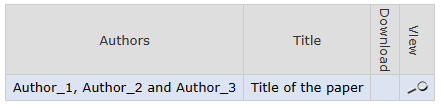
- Then click “Update authors” to update author information (Ensure ALL paper authors are included on the author list and in the correct order.)
- Click on “Upload new version” to submit ALL files of your papers.
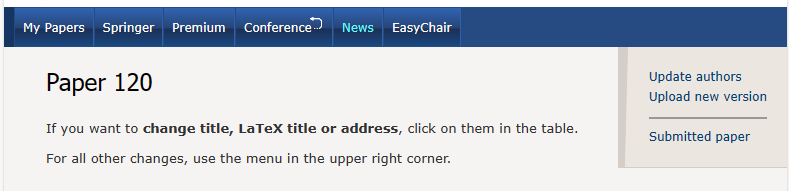
- Choose 3 tabs to submit the DOC file, PDF file and PPF signed form file:
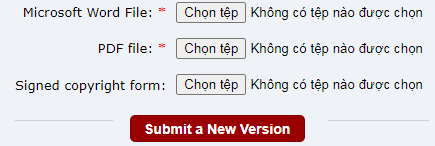
- Depending on your file size and internet connection speed, it may take a few minutes to upload. A confirmation message will be displayed if the file is uploaded successfully. You will also receive a confirmation email with the details of your submission.